ChatGPT vs Claude vs Gemini vs Grok: Which AI Is Best in 2027? (And How to Get All 4 for $20)
In this guide
- Quick comparison: ChatGPT vs Claude vs Gemini vs Grok
- ChatGPT: the best all-rounder
- Claude: best for writing and coding
- Gemini: best for research and Google users
- Grok: best for real-time news and trends
- Which AI is best for what?
- Test them yourself: 4 prompts that show the differences
- How much do ChatGPT, Claude, Gemini and Grok cost?
- The cheaper way: get all 4 AI models in one subscription
- Bluehost AI All-Access Pack review
- Is an all-in-one AI subscription worth it?
- How to get started with the Bluehost AI All-Access Pack
- How bloggers can use all four AIs together
- Our verdict
ChatGPT, Claude, Gemini and Grok can all write, research, summarize and code. So which one should you actually pay for?
We use AI every day to research, outline and edit the guides on this site. The honest answer is that each one is better at different things, and that's why so many people end up paying for two or three subscriptions. Below we compare ChatGPT vs Claude vs Gemini vs Grok in plain English: what each is good at, what it costs, and how to get all four for the price of one.
Disclosure: Some links below are affiliate links. We may earn a commission at no extra cost to you. Learn more.
Quick comparison: ChatGPT vs Claude vs Gemini vs Grok
| AI | Made by | Best for | Standout feature | Paid plan* |
|---|---|---|---|---|
| ChatGPT | OpenAI | Everyday all-rounder | Images, voice and custom GPTs | Plus: $20/mo |
| Claude | Anthropic | Writing, long documents, coding | Natural, careful writing | Pro: $20/mo |
| Gemini | Research and Google apps | Works inside Gmail, Docs and Drive | AI Pro: $19.99/mo | |
| Grok | xAI | News, trends, real-time topics | Live data from X | SuperGrok: $30/mo |
| All four in one | Bluehost | Using the right AI for each task | Switch models mid-chat | $20/mo |
*Standard US monthly prices as of November 2026. AI companies change plans and prices often, so check before you buy.
ChatGPT: the best all-rounder
ChatGPT is the AI most people try first, and for good reason. It's fast, friendly and good at almost everything: answering questions, brainstorming ideas, explaining tricky topics, summarizing documents, writing emails and helping with code.
Where it really pulls ahead is features. ChatGPT can create and edit images, hold a natural voice conversation, search the web, remember your preferences and run custom GPTs built for specific jobs. If you want one tool that does a bit of everything well, this is it.
👍 Strengths
- Most versatile all-round assistant
- Built-in image generation and voice
- Huge library of custom GPTs
- Great for brainstorming and outlines
👎 Weaknesses
- Writing can sound generic without good prompts
- Tends to agree with you too easily
- Best features are on paid plans
Claude: best for writing and coding
Claude, made by Anthropic, has a reputation for writing that sounds like a person wrote it. Bloggers, marketers and authors often prefer it for long-form drafts, rewriting and editing because it follows tone instructions closely and avoids a lot of the filler other tools add.
It's also excellent with long documents. You can upload a report, contract or a stack of notes and get a careful, well-structured summary. Developers rate it highly for coding, and Bluehost describes it as "the QA model" because it's good at checking work.
👍 Strengths
- Natural, human-sounding writing
- Handles very long documents well
- Strong at coding and careful reasoning
- Good at editing and fact-checking drafts
👎 Weaknesses
- Doesn't generate images
- Usage limits can be tight on heavy days
- Fewer extras than ChatGPT
Gemini: best for research and Google users
Gemini is Google's AI, and its biggest advantage is that it plugs into the Google tools you already use. It can work inside Gmail, Docs, Sheets and Drive, summarize YouTube videos and pull from Google Search.
It's a strong pick for research. Gemini can read very long files and its Deep Research feature builds detailed reports with sources. The paid Google AI Pro plan also bundles extra Google storage, which is a nice bonus if you already pay for Google One.
👍 Strengths
- Deep integration with Gmail, Docs and Drive
- Great for research and long files
- Fast and good with images and video
👎 Weaknesses
- Writing can feel a little flat
- Best value only if you live in Google's apps
Grok: best for real-time news and trends
Grok comes from xAI, Elon Musk's AI company, and it has one clear edge: real-time access to X (Twitter). If you want to know what people are saying about something right now, from breaking news to a trending product, Grok usually has the freshest answer.
It also has a more casual, playful personality. That's fun for brainstorming social posts and hooks, but it's less buttoned-up than the others for formal work.
👍 Strengths
- Live information from X
- Great for trends and hot topics
- Creative, conversational tone
👎 Weaknesses
- Most expensive of the four on its own
- X posts aren't always reliable sources
- Less polished for formal writing
Which AI is best for what?
Here's how we'd split the work if you had all four:
| Task | Best pick | Runner-up |
|---|---|---|
| Writing blog posts and articles | Claude | ChatGPT |
| Brainstorming, outlines and headlines | ChatGPT | Claude |
| Research with sources | Gemini | ChatGPT |
| Coding and debugging | Claude | ChatGPT |
| Creating images | ChatGPT | Gemini |
| Breaking news and trends | Grok | Gemini |
| Summarizing long PDFs | Claude | Gemini |
| Email and Google Docs work | Gemini | ChatGPT |
| Social media hooks and captions | Grok | ChatGPT |
Notice a pattern? No single AI wins every row. That's why the smartest way to use AI in 2027 is to ask more than one and keep the best answer.
Test them yourself: 4 prompts that show the differences
Benchmarks only tell you so much. The fastest way to find your favorite is to give every AI the same prompt and compare. Try these:
1. Writing voice. This shows which one sounds most like a real person.
Write a 120-word intro for a blog post titled "How I Meal Prep for a Week on $50". Write in first person, casual and warm, like you're talking to a friend. No clichés and no exclamation marks.
2. Research. Look for specific facts, dates and sources you can check.
What are the 5 biggest changes in how people search Google this year? For each one, explain what it means for a small blog and give me a source I can verify.
3. Real-time knowledge. This is where Grok and web search usually stand out.
What are people saying online this week about [topic or product]? Summarize the main opinions and tell me how recent your information is.
4. Editing. Paste a paragraph you wrote and see who improves it without losing your voice.
Edit this paragraph to be clearer and more engaging. Keep my voice and meaning, don't add new claims, and explain your 3 most important changes: [paste your paragraph]
Tip: When two AIs disagree on a fact, that's your cue to check the original source. Comparing answers is one of the easiest ways to catch mistakes before your readers do.
How much do ChatGPT, Claude, Gemini and Grok cost?
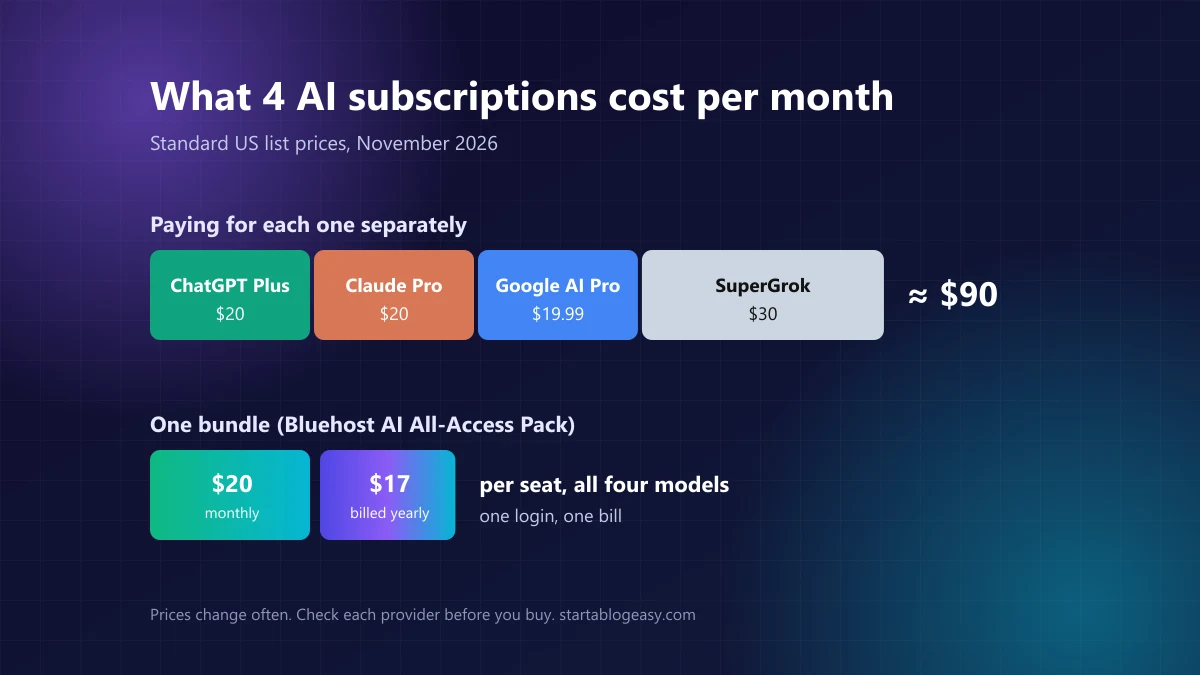
Each company has a free plan, but the good stuff (the smartest models, higher limits, file uploads and research tools) sits behind a subscription:
| Plan | Monthly price |
|---|---|
| ChatGPT Plus | $20 |
| Claude Pro | $20 |
| Google AI Pro (Gemini) | $19.99 |
| SuperGrok | $30 |
| Total for all four | about $90/month (over $1,000 a year) |
That adds up fast. Most people don't need all four every day, but once you've used a second AI to double-check the first, it's hard to go back to just one.
The cheaper way: get all 4 AI models in one subscription
This is where all-in-one AI subscriptions come in. Instead of four logins and four bills, you get several top models in one app. The one we're most excited about is from a name you already know from web hosting: Bluehost.
Bluehost AI All-Access Pack review
Bluehost AI All-Access Pack
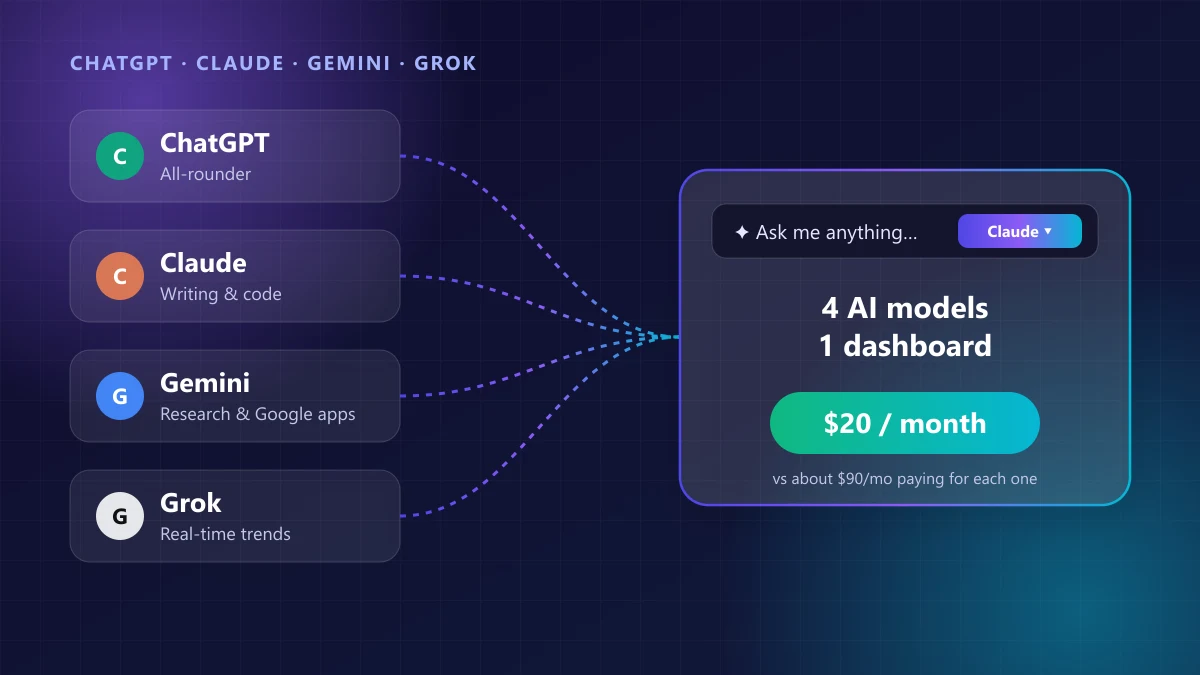
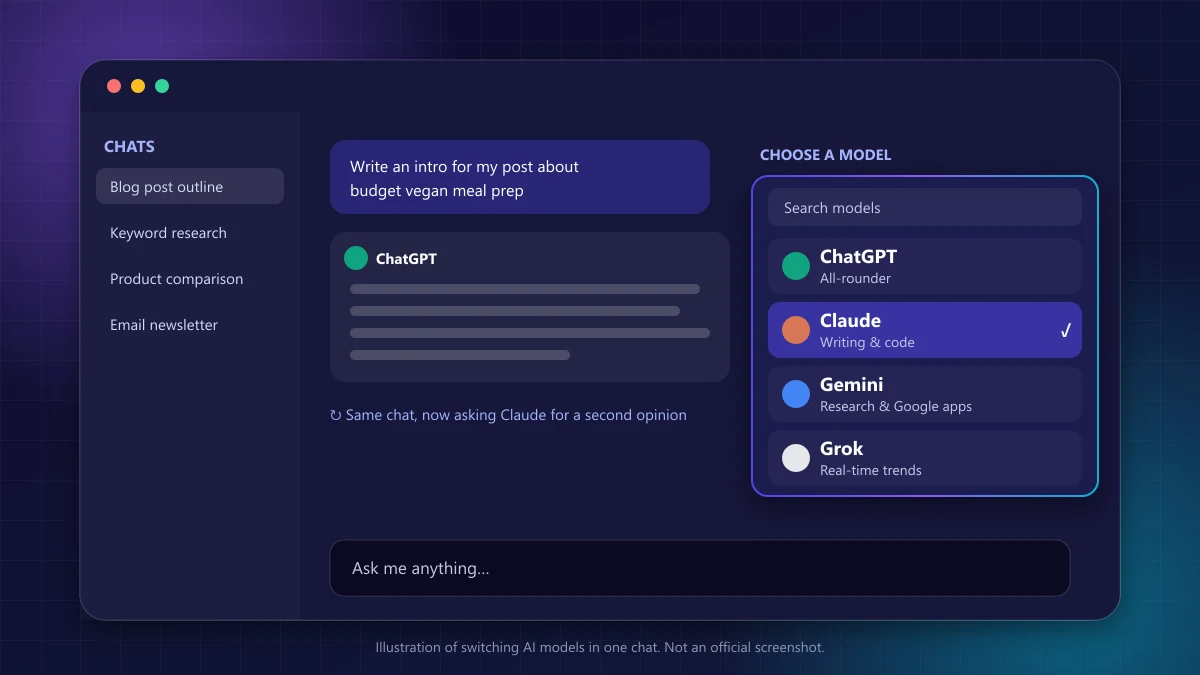
The AI All-Access Pack gives you the paid versions of all four models in one dashboard. You type into a single "Ask me anything" box and pick the model from a dropdown. You can switch models in the middle of a conversation without copying your chat into another tab, so getting a second opinion takes one click.
You can also compare answers side by side and keep whichever is best. Bluehost says you always get the latest model versions automatically, and for Claude that includes the current Opus, Sonnet and Haiku models.
👍 Pros
- All four premium AIs for the price of one
- Switch models without losing your chat
- Side-by-side answer comparison
- Research Agent, Presentation Builder and AI Article Writer included
- Import your memory from ChatGPT, Claude or Gemini
- Team seats and an admin dashboard
👎 Cons
- No free trial and no refunds on AI products
- Usage limits aren't published as exact numbers
- Extras inside each company's own apps may not carry over
What's included
- Four premium AI models: ChatGPT, Claude, Gemini and Grok, including Grok's real-time access to X.
- Model switching and comparison: change models mid-chat or compare responses before choosing one.
- Ready-made AI agents: a Research Agent that builds cited reports, a Presentation Builder for slide decks and an AI Article Writer for SEO-ready drafts.
- Chat Memory: it remembers your preferences, and you can import your saved preferences and instructions from ChatGPT, Gemini or Claude. Full chat history, projects and files don't come across.
- Speech-to-text in multiple languages.
- Team management: buy seats, assign them, set permissions and monitor usage from one admin dashboard. Agencies can even give clients access.
Pricing and plans
| Plan | Monthly | Billed yearly | Best for |
|---|---|---|---|
| AI All-Access Pack | $20/seat | $17/seat per month | Individuals, bloggers, small teams |
| AI All-Access Pack Privacy+ | n/a | $25/seat per month | Businesses handling sensitive data |
Privacy+ adds a privacy mode that masks sensitive details before your prompt reaches the AI, end-to-end encryption, PIN protection and an incognito mode. Bluehost aims it at law firms, healthcare providers and agencies. Most bloggers and freelancers will be fine with the standard pack.
Black Friday deal: until November 30, 2026, Bluehost is taking 15% off the first year of the AI All-Access Pack on yearly billing, with bigger discounts (20% or 25%) when you buy it together with hosting or other Bluehost products in the same order. The discount is applied automatically at checkout and doesn't apply to monthly billing.
Usage limits: what "all access" really means
All access doesn't mean unlimited. Bluehost says every plan has usage limits "well above what a typical user needs", and it sends alerts as you reach 50%, 80% and 90% of your allowance. If you run out of premium usage in a billing cycle, premium models pause until your plan renews and your chats continue on non-premium models. Uploading large files, very long conversations and image editing use up your allowance faster.
No free trial: start monthly
Bluehost doesn't offer a free trial for the AI All-Access Pack, and its 30-day money-back guarantee covers hosting, not AI products. Our advice: start on the $20 monthly plan, use it for a few weeks, and switch to yearly billing once you know you'll stick with it.
Is an all-in-one AI subscription worth it?
It comes down to how many AI tools you'd pay for anyway.
- You use two or more AIs: a bundle is a no-brainer. Two separate subscriptions already cost $40 a month, and the bundle gives you four for $20.
- You want to try them all: one $20 month is a cheap way to find out which AI fits how you work.
- You manage a team or clients: one bill, one dashboard and seat controls save real admin time.
- You only ever use one AI: stick with that company's own plan. You'll get every app-specific feature, like Gemini inside Gmail or ChatGPT's desktop and mobile apps.
- You're a very heavy user: check the usage limits first. Power users who code all day may need the higher tiers sold directly by OpenAI or Anthropic.
How to get started with the Bluehost AI All-Access Pack
- Go to the AI All-Access Pack page and choose monthly or yearly billing.
- Pick your plan and number of seats. One seat is one user. You can add more later.
- Check out with a credit card, Google Pay or PayPal. You don't need a Bluehost hosting account.
- Download your recovery key when the chat screen asks. Keep it somewhere safe in case you're ever locked out.
- Import your memory from ChatGPT, Claude or Gemini so the AI already knows your preferences.
- Open "Ask me anything", pick a model from the dropdown and start chatting. Switch models any time you want a second opinion.
How bloggers can use all four AIs together
If you run a blog (or are about to start one), having every model in one place fits neatly into a writing workflow:
- Find a trending angle with Grok: see what people are talking about in your niche this week.
- Research with Gemini: gather facts, stats and sources you can link to.
- Outline with ChatGPT: turn the research into a clear structure and a few headline options.
- Draft with Claude: write section by section, adding your own stories and opinions.
- Cross-check: ask a different model to fact-check and point out anything vague or wrong.
Whatever tools you use, the final post should still sound like you. Google rewards helpful content however it's made, but mass-producing unedited AI articles can hurt your whole site. Our guide on how to write a blog post with AI walks through the full process with copy-and-paste prompts.
Our verdict
In the ChatGPT vs Claude vs Gemini vs Grok debate, there's no single winner. ChatGPT is the best all-rounder, Claude writes and codes best, Gemini is the research and Google powerhouse, and Grok knows what's happening right now.
So don't pick one. If you use AI for work, a blog or a business, the Bluehost AI All-Access Pack is the simplest and cheapest way to have all four on hand. It costs the same as one regular subscription. Start monthly, compare the answers, and let the results decide your favorite.
Try the AI All-Access Pack →Prices and features are from Bluehost's official AI All-Access Pack pages and each AI provider's published plans, checked November 2026. AI products change quickly, so confirm current details before you buy.
Frequently asked questions
Which is better: ChatGPT, Claude or Gemini?
It depends on the job. ChatGPT is the most versatile all-rounder with strong image and voice features. Claude is usually preferred for natural-sounding writing, long documents and coding. Gemini is best for research and anyone who lives in Gmail, Docs and Drive. Many people use two or more and pick the best answer.
Is there one subscription for ChatGPT, Claude, Gemini and Grok?
Yes. Bluehost's AI All-Access Pack gives you the paid versions of ChatGPT, Claude, Gemini and Grok in one dashboard for $20 per month per seat, or $17 per month billed yearly. You can switch models in the same conversation and compare answers side by side.
How much does it cost to subscribe to ChatGPT, Claude, Gemini and Grok separately?
At standard US list prices it's about $90 a month: ChatGPT Plus $20, Claude Pro $20, Google AI Pro $19.99 and SuperGrok $30. Prices change often, so check each provider before you buy.
Do I need Bluehost hosting to use the AI All-Access Pack?
No. The AI All-Access Pack is a standalone subscription. You don't need a website or a Bluehost hosting plan to buy it.
Does the Bluehost AI All-Access Pack have a free trial?
According to Bluehost, there is no free trial and AI products are not covered by its 30-day money-back guarantee. Start with the monthly plan if you want to test it before paying for a year.
Which AI is best for writing blog posts?
Claude is a favorite for long-form writing because its drafts tend to sound more natural. ChatGPT is excellent for outlines, headlines and brainstorming, and Gemini helps with research. The best results come from using AI for the draft and adding your own experience, examples and opinions.
Is Grok better than ChatGPT?
Grok is better for anything happening right now because it can pull real-time information from X. For most everyday tasks like writing, planning and explaining things, ChatGPT is more polished and versatile.
Are there usage limits on the AI All-Access Pack?
Yes. Bluehost says every plan has usage limits that are well above what a typical user needs. If you use up your premium usage in a billing cycle, premium models pause until your plan renews and your chats continue on non-premium models.