Best Blogging Platform in 2027: Free and Paid Options Compared
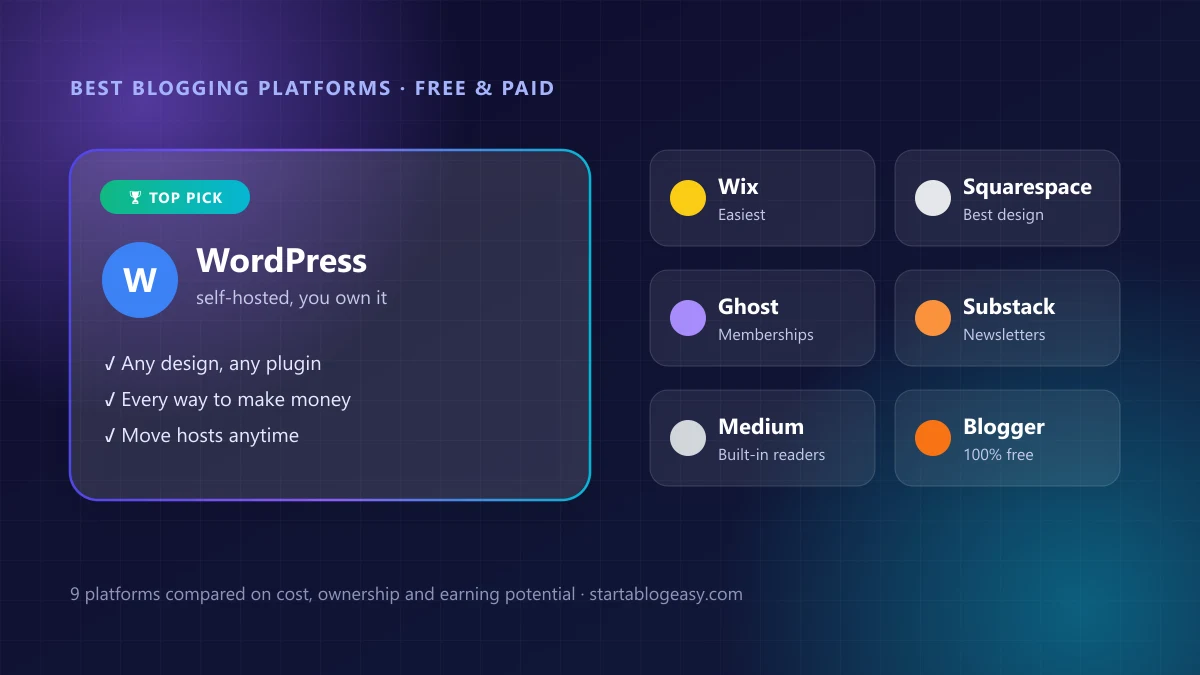
In this guide
- Quick comparison: the best blogging platforms
- How we chose the best blogging platforms
- WordPress (self-hosted): best blogging platform overall
- WordPress.com: best free WordPress option
- Wix: easiest drag-and-drop blogging platform
- Squarespace: best design
- Hostinger Website Builder: cheapest all-in-one option
- Ghost: best for paid memberships
- Substack: best for newsletter-style blogs
- Medium: best for built-in readers
- Blogger: best 100% free blogging platform
- Which blogging platform should you choose?
- Best free blogging platform
- Best blogging platform for making money
- Free vs paid: what does a blog really cost?
- Can you switch blogging platforms later?
- Our verdict
The blogging platform you pick decides how much your blog can grow, how you can make money from it, and whether you actually own it. Choose well and you never have to think about it again. Choose badly and you'll face a painful move a year from now.
We've been helping beginners start blogs since 2019 and have tried most of these platforms along the way. Below we compare the best blogging platforms of 2027, both free and paid, so you can pick the right one in a few minutes.
Disclosure: Some links below are affiliate links. We may earn a commission at no extra cost to you. Learn more.
Quick comparison: the best blogging platforms
| Platform | Best for | Free plan? | Paid from* | Make money? | You own it? |
|---|---|---|---|---|---|
| WordPress + Bluehost | Best overall, making money | No | $3.99/mo | ✅ Every way | ✅ Yes |
| WordPress.com | Free WordPress to start | ✅ Yes | ~$4/mo yearly | ⚠️ Paid plans | ⚠️ Mostly |
| Wix | Easiest drag and drop | ✅ Yes | ~$17/mo | ⚠️ Limited | ❌ Locked in |
| Squarespace | Beautiful design | Trial only | ~$16/mo | ⚠️ Limited | ❌ Locked in |
| Hostinger | Cheapest all-in-one | No | ~$2.99/mo | ⚠️ Limited | ⚠️ Limited |
| Ghost | Paid memberships | Self-host only | ~$9/mo yearly | ✅ Memberships | ✅ Yes |
| Substack | Newsletter-style blogs | ✅ Yes | Free (10% of paid subs) | ✅ Subscriptions | ⚠️ Mostly |
| Medium | Built-in readers | ✅ Yes | Free | ⚠️ Partner Program | ❌ No |
| Blogger | 100% free blog | ✅ Yes | Free | ⚠️ AdSense | ⚠️ Google owns it |
*Starting prices as of November 2026, usually with yearly or longer billing. Prices change often, so check each platform before you sign up.
How we chose the best blogging platforms
We judged every platform on the six things that matter most to a new blogger:
- Ownership: can you take your content, design and audience with you if you leave?
- Making money: can you run ads, affiliate links, products and memberships without limits?
- Ease of use: can a complete beginner launch a good-looking blog in an afternoon?
- SEO: does it give you control over titles, URLs, speed and everything Google cares about?
- Cost: what you really pay in year one and after.
- Room to grow: will it still fit when your blog has 100,000 visitors a month?
1. WordPress (self-hosted): best blogging platform overall
WordPress + Bluehost
Self-hosted WordPress (the free software from WordPress.org) runs over 40% of all websites, from tiny hobby blogs to huge news sites. You install it on your own hosting, which means you own everything: your posts, your design, your email list and your income.
It's the best platform for making money because nothing is off limits. Display ads, affiliate links, sponsored posts, digital products, courses and memberships all work, and there's a plugin for almost anything. It's also the most SEO-friendly option, which matters because Google is where most blog traffic comes from.
WordPress used to be tricky for beginners, but that's changed. With Bluehost, the WordPress AI Builder designs your blog for you from a short description, so you can be live in under an hour.
👍 Pros
- You fully own your blog
- Every way to make money
- Best SEO control
- Thousands of themes and plugins
- Move to any host anytime
👎 Cons
- You pay for hosting
- Updates and backups are your job (most hosts automate them)
- A small learning curve
👉 Follow our free step-by-step guide on how to start a blog, or jump straight to setting up hosting and WordPress.
2. WordPress.com: best free WordPress option
WordPress.com
WordPress.com is a hosted service run by Automattic. It uses the same WordPress software, but they handle hosting, security and updates for you. The free plan is a nice way to try blogging, though your address will be yourblog.wordpress.com and visitors may see ads.
Paid plans add a custom domain, remove ads and unlock more features, with the higher tiers adding plugins and advanced SEO tools. It's a good middle ground, but once you're paying for a higher tier, self-hosted WordPress usually gives you more for less.
👍 Pros
- Free to start
- No technical maintenance
- Easy upgrade path
👎 Cons
- Free plan has ads and a subdomain
- Monetization and plugins need paid plans
- Can get pricey on higher tiers
Confused by the two WordPress names? WordPress.org is the free software you install on your own hosting. WordPress.com is a company that hosts it for you. Our WordPress theme guide explains how the design side works on both.
3. Wix: easiest drag-and-drop blogging platform
Wix
Wix lets you drag anything anywhere on the page, and its AI setup can build a whole site from a quick chat. It's ideal if your blog is part of a small business website and you care more about simplicity than blogging power.
The catch is that you can't move a Wix site to another host. If your blog takes off, you're tied to Wix's pricing and features.
👍 Pros
- Very easy to use
- Great templates and AI setup
- Hosting and security included
👎 Cons
- Locked in: you can't export your site
- Blogging features are basic
- Gets expensive as you grow
4. Squarespace: best design
Squarespace
Squarespace is famous for gorgeous, polished templates. Photographers, designers, restaurants and creatives love it because everything looks good with almost no effort. Hosting, SSL and security are all included.
Like Wix, it's a closed platform with fewer plugins and integrations, and it's not built for serious blog monetization.
👍 Pros
- Beautiful, consistent designs
- All-in-one and low maintenance
👎 Cons
- No free plan
- Locked into the platform
- Limited blogging tools
5. Hostinger Website Builder: cheapest all-in-one option
Hostinger Website Builder
Hostinger bundles hosting, a domain and an AI-powered drag-and-drop builder at one of the lowest prices around. It's a good pick for a simple site or a small blog on a tight budget.
The lowest price needs a long commitment, and the builder is less flexible than WordPress for a growing blog. If you like Hostinger's prices, their WordPress hosting is the better long-term choice for blogging.
👍 Pros
- Very cheap to start
- Simple editor with AI tools
👎 Cons
- Lowest price needs a long term
- Harder to move your site later
6. Ghost: best for paid memberships
Ghost
Ghost is an open-source platform built for writers who want to earn from paid memberships and newsletters. Blog posts and emails live in one place, and readers can subscribe for free or pay monthly. Unlike Substack, Ghost doesn't take a cut of your subscription revenue.
It's fast, clean and great for SEO, but it has far fewer themes and integrations than WordPress.
👍 Pros
- Built-in memberships and newsletters
- 0% revenue cut
- Fast and clean
👎 Cons
- Smaller ecosystem
- Self-hosting is technical
7. Substack: best for newsletter-style blogs
Substack
Substack turns every post into an email to your subscribers. Setup takes minutes, it costs nothing until you earn, and its recommendation network can help new writers find readers.
The trade-offs: Substack takes 10% of paid subscription revenue (plus card fees), design options are minimal, and it isn't built for Google traffic or affiliate income. You can export your email list if you leave, which is a big plus.
👍 Pros
- Free and instant setup
- Built-in paid subscriptions
- Discovery network
👎 Cons
- 10% cut of paid subs
- Very little design control
- Weak for SEO and affiliates
8. Medium: best for built-in readers
Medium
Medium is less a blog and more a big shared magazine. There's nothing to set up, and its huge audience means a good story can get read on day one. Through the Medium Partner Program, you earn based on how long paying members spend reading your work.
But you don't own the platform, your earnings depend on Medium's rules, and you can't run your own ads or build a real brand there. Many writers use Medium to repost articles from their own blog for extra reach.
👍 Pros
- Zero setup
- Built-in audience
- Clean writing experience
👎 Cons
- You don't own your platform
- No ads or custom design
- Income can change overnight
9. Blogger: best 100% free blogging platform
Blogger
Blogger has been around since 1999 and is still completely free. Sign in with a Google account and you can publish in minutes. Surprisingly, it even lets you connect a custom domain and run Google AdSense at no cost.
The downside is that Blogger hasn't changed much in years. Templates look dated, there are few features, and Google controls the platform.
👍 Pros
- Totally free, including custom domains
- AdSense built in
- Very simple
👎 Cons
- Dated designs
- Few features or integrations
- Google owns the platform
Which blogging platform should you choose?
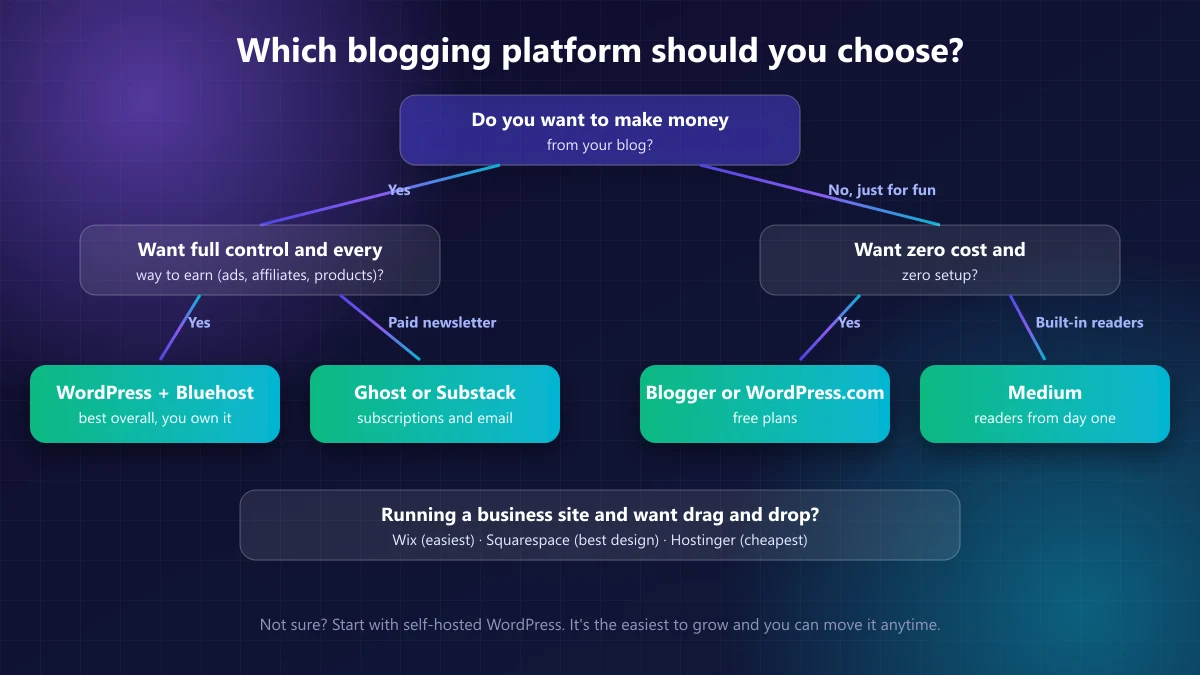
- You want to make money and grow a real blog? → WordPress with Bluehost
- You want paid newsletter subscriptions? → Ghost (no revenue cut) or Substack (easiest)
- You want a free blog just for fun? → Blogger or WordPress.com
- You want readers without building an audience? → Medium
- You run a small business and want drag and drop? → Wix, Squarespace or Hostinger
Want AI to design your site for you? We compared the options in our guide to the best AI website builders.
Best free blogging platform
If you want to blog for free, these are your best options, ranked:
- Blogger: the only one that's fully free with a custom domain and AdSense included.
- WordPress.com (free plan): the best choice if you might upgrade later, because you're already on WordPress.
- Substack: free until you earn, and perfect for a newsletter-style blog.
- Medium: free with a built-in audience, but you don't own anything.
- Wix (free plan): easy to use, but your site carries Wix branding and ads.
The hidden cost of a free blog
Free platforms are great for testing an idea, but they come with trade-offs:
- A long, branded address like yourblog.wordpress.com looks less professional and is harder to remember.
- Limited ways to earn. Many free plans restrict ads and affiliate links, or the platform shows its own ads.
- You're a guest on someone else's platform. Rules, fees and features can change at any time.
- Moving later is work. The bigger your free blog gets, the harder it is to switch.
Tip: If there's any chance you'll want to make money, start on self-hosted WordPress from day one. It costs roughly the price of a coffee a month and saves you a migration later. See how bloggers make money for what's possible.
Best blogging platform for making money
Here's how each platform handles the main ways bloggers earn:
| Platform | Display ads | Affiliate links | Digital products | Paid memberships |
|---|---|---|---|---|
| WordPress (self-hosted) | ✅ | ✅ | ✅ | ✅ |
| Ghost | ⚠️ Manual | ✅ | ⚠️ Basic | ✅ 0% cut |
| Substack | ❌ | ⚠️ Limited | ❌ | ✅ 10% cut |
| WordPress.com | ⚠️ Paid plans | ✅ | ⚠️ Higher plans | ⚠️ Higher plans |
| Wix / Squarespace | ⚠️ Limited | ✅ | ✅ | ✅ |
| Blogger | ✅ AdSense | ✅ | ❌ | ❌ |
| Medium | ❌ | ⚠️ Limited | ❌ | ⚠️ Partner Program |
Self-hosted WordPress is the only platform that ticks every box, and it doesn't take a percentage of anything you earn. That's why almost every full-time blogger you've heard of uses it.
Free vs paid: what does a blog really cost?
A self-hosted WordPress blog typically costs $50 to $150 for the first year: hosting from a few dollars a month (Bluehost includes a free domain for the first year), with free themes and plugins covering everything else. Here's a rough first-year comparison:
| Setup | Approximate first-year cost |
|---|---|
| Blogger, Medium, Substack | $0 (plus a domain if you want one) |
| WordPress with Bluehost | About $50 to $150 |
| WordPress.com paid plans | About $50 to $300 |
| Wix or Squarespace | About $190 to $350 |
Watch out for renewal prices. Most hosts and builders charge more after the first term, so check what you'll pay in year two.
Can you switch blogging platforms later?
Yes, but some exits are much easier than others:
- WordPress: the easiest to move. You can switch hosts anytime and keep everything.
- Substack and Ghost: you can export your posts and email list.
- Medium and Blogger: you can export posts, but you'll rebuild the design and lose built-in features.
- Wix and Squarespace: the hardest. You can't export your site design, so moving means rebuilding.
When you move, set up 301 redirects from old URLs to new ones so you keep your Google rankings. Then submit your blog to Google again.
Our verdict
The best blogging platform for most people in 2027 is self-hosted WordPress. It's affordable, you own everything, and it's the only option with no limits on how you make money. With AI builders now doing the design work, it's also easier to set up than ever.
If you just want to write for fun and spend nothing, Blogger or WordPress.com's free plan will do the job. If paid newsletters are your thing, look at Ghost or Substack.
Ready to start? Our free guide on how to start a blog walks you through every step, from choosing a name to publishing your first post.
Start Your WordPress Blog →Prices and features checked November 2026 from each platform's published plans and recent reviews. Platforms change pricing often, so confirm current details before you sign up.
Frequently asked questions
What is the best blogging platform?
For most people, self-hosted WordPress is the best blogging platform. It powers over 40% of all websites, you fully own your content, and you can make money with ads, affiliate links, products and memberships. Hosting starts at a few dollars a month.
What is the best free blogging platform?
Blogger is the best completely free blogging platform because it even lets you use a custom domain and Google AdSense at no cost. WordPress.com's free plan is the better choice if you think you'll upgrade to a more professional site later.
Which blogging platform is best for making money?
Self-hosted WordPress is the best blogging platform for making money because there are no limits on ads, affiliate links, digital products, courses or memberships. Ghost and Substack are excellent if your main income will be paid newsletter subscriptions.
Is WordPress free?
The WordPress software (WordPress.org) is free and open source, but you need hosting and a domain to run it, which typically costs $50 to $150 for the first year. WordPress.com is a separate hosted service with a free plan and paid upgrades.
What is the difference between WordPress.com and WordPress.org?
WordPress.org is the free software you install on your own hosting, giving you full control. WordPress.com is a company that hosts WordPress for you, with a free plan and paid tiers that unlock more features. Most serious bloggers use self-hosted WordPress.org.
Can you make money on a free blog?
Yes, but it's harder. Blogger allows AdSense, and Medium pays writers through its Partner Program based on member reading time. Free plans on most other platforms limit ads, branding or monetization, which is why most money-making blogs move to self-hosted WordPress.
Is Substack better than WordPress for a blog?
Substack is better if you mainly want an email newsletter with paid subscriptions and zero setup. WordPress is better if you want a full website, Google traffic, affiliate income and complete ownership. Substack takes 10% of paid subscription revenue; WordPress takes nothing.
Can I switch blogging platforms later?
Usually yes, but some moves are easier than others. WordPress blogs can move to any host. Wix and Squarespace are hard to leave because you can't export the design. Picking the right platform at the start saves you a painful migration later.